“I work in a corporate company, my HR sends me an email regarding some product update. But there are some products that need to add to that list. So I want to convert this email template to EML format so that it can be edited as per my requirements? ”
“Is there any secure way to export OFT files to EML file format?”
Do you have some Outlook template files and want to export them into EML file format? Then you are in right place. Today we will talk about an effective and reliable method to convert OFT to EML file format in a flash.
There are many scenarios where the user wants to customize the Outlook template file. In that condition, the user needs to export that file to another file format so that it can be changed easily.
Before moving forward, let get to know about the OFT file format. The OFT file is an Outlook template file that is used as an email template and has a layout that is formatted in advance. It is used to send the same emails using the template created to save time.
Now the main question arises – How to convert OFT to EML? To solve this query we are going to discuss it in the next coming section. But before that let get to know the reasons for this conversion.
Reason to Export OFT to EML
There can be many scenarios where users need to convert Outlook template files to other file formats. The Outlook template can save time by sending the same message to many, but it cannot be changed. If the receiver wants to make some changes then it is not possible with the .oft file. To do some particular changes, the user must export this file format to another file format that can be easy to alter.
After searching, we came up with a simple approach that transfer Outlook Template files to EML like child’s play. In the next section, we will discuss this method in detail.
Method to Convert OFT to EML using Automated Tool
There are many sources that do the conversion, but it is a tiring task to find a perfect solution. If you are also among those users who got tired of looking for the best method to export OFT to EML. Then your search ends here.
OFT to EML Converter is an amazing tool that provides a variety of options in a single interface. It is an automated tool that makes your work easier and exports OFT to EML with just a few clicks. This tool converts Outlook template files in bulk without data loss. This utility is easy to use but comes with powerful working.
Now let’s check the working of this tool and see how this tool converts Outlook Template Files into EML file format.

Steps to Export OFT to EML using OFT to EML Converter
Follow the below steps to convert Outlook template files into EML file formats, make sure to perform each step in the same manner mentioned below.
Step 1. Install and run the tool on the system.
Step 2. After that, click on the Open option present on the software interface.

Step 3. Here Select Email Data File >> Select OFT Files >> Select Files or Select Folders.

Step 4. Now after this, this software preview all OFT emails in its interface to view/read the emails.

Step 5. Move the cursor to the Export option and select EML file format to convert.
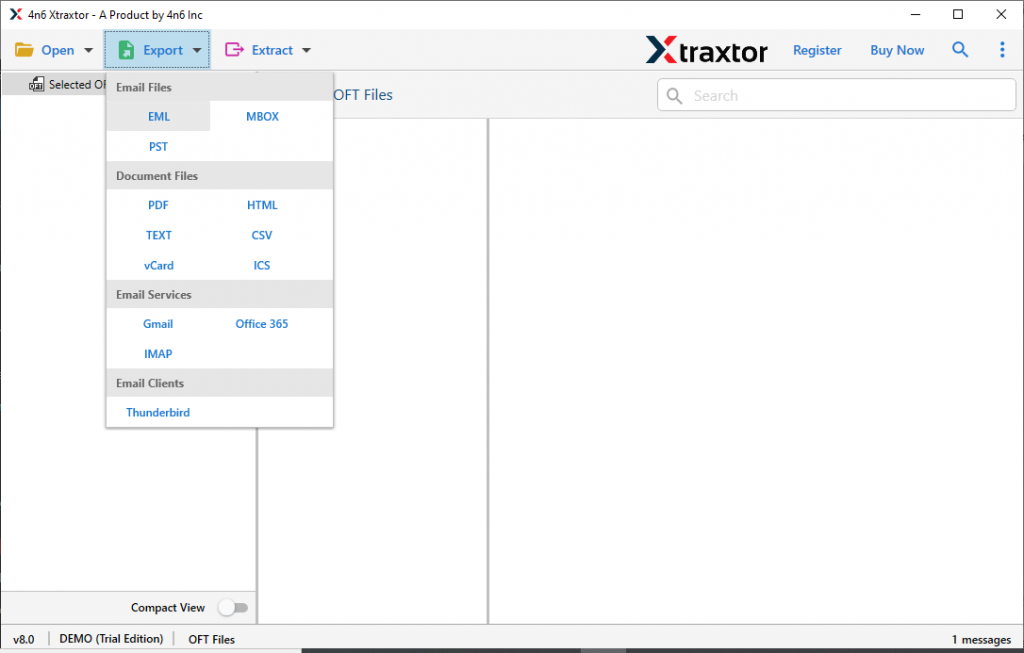
Step 6. In the last, browse the location to save the converted file and hit the Save button.

Here completes the OFT to EML conversion, the user can go to the selected saved location. And check for the .eml file created by this converter. This tool has some amazing features that make it standalone among other tools. Some of them are mentioned in the next section.
OFT to EML Converter – Why Choose it for conversion
There are many reasons that force users to choose this tool, from the interface to its powerful operation. Some of them stated below;
- Export OFT to a file format array
This converter offers the ability to convert various OFT files to EML and other file formats. The user must choose the desired file format for conversion. Most importantly, all these file formats for exporting OFT files are present in a single interface. - Convert Outlook templates in bulk
With this tool, it is easy to export multiple email templates to EML and other file formats. Best way to batch convert OFT to EML without loss of data and all email properties. - Simple user interface
This tool is designed with inexperienced users in mind. This tool is easy to use due to its self-explanatory feature. The user does not face any problem when using this tool even if it is the first time. - Supports all Windows OS
This smart software works on all Windows operating systems without facing compatibility issues. It is compatible with Windows11, 10, Vista, XP and other previous versions without any glitches. - Dual file selection option
With this tool, users can import OFT files in dual mode. The user can select a single OFT file or folder that contains multiple email files. - Email filter option
This tool offers multiple filter options to convert selected emails. This feature allows users to export emails with specific properties from tons of OFT files. - Export emails to the cloud
With this utility, users can export email files to an email server or cloud-based email clients. Outlook template files can be easily transferred to Office 365, Yahoo, Thunderbird, Zimbra, Gmails, and other file formats.
Conclusion
OFT to EML Converter is the best way to export Outlook template files to multiple file formats. The best benefit to using this tool is that it works on its own, the user only needs to make a few clicks. It intelligently convert OFT to EML with all attributes and properties. If you want to do the conversion, give this tool an advantage and try the demo version of this software and do the process yourself.