Summary: Looking for a reliable solution to save MailSpring emails in PDF format? If you are among them, today in this article we will discuss a workable and secure solution to convert MailSpring emails to PDF format.
There can be a situation where users want to save their emails for future use. Such a scenario we are going to discuss in this write-up. As there is no manual solution available to export MailSpring emails to PDF format. it is best to rely on the best-automated solution. One such solution we are going to discuss here.
How to Convert MailSpring Emails to PDF Format?
Whenever you need to save mailbox emails in PDF format, everything you need to install and use MailSpring Converter. This software is specially designed to export MailSpring emails to PDF file. After that, the mailbox emails will be easy to access in any application that supports the .pdf format.

Steps to Export MailSpring Emails to PDF Format
Follow the given instruction and save mailbox emails in portable file format (.pdf).
Step 1. Download and run this software on your machines.
Step 2. Here click on Open >> Desktop Email Client >>MailSpring Account >> Open Account or Seelct Folder.
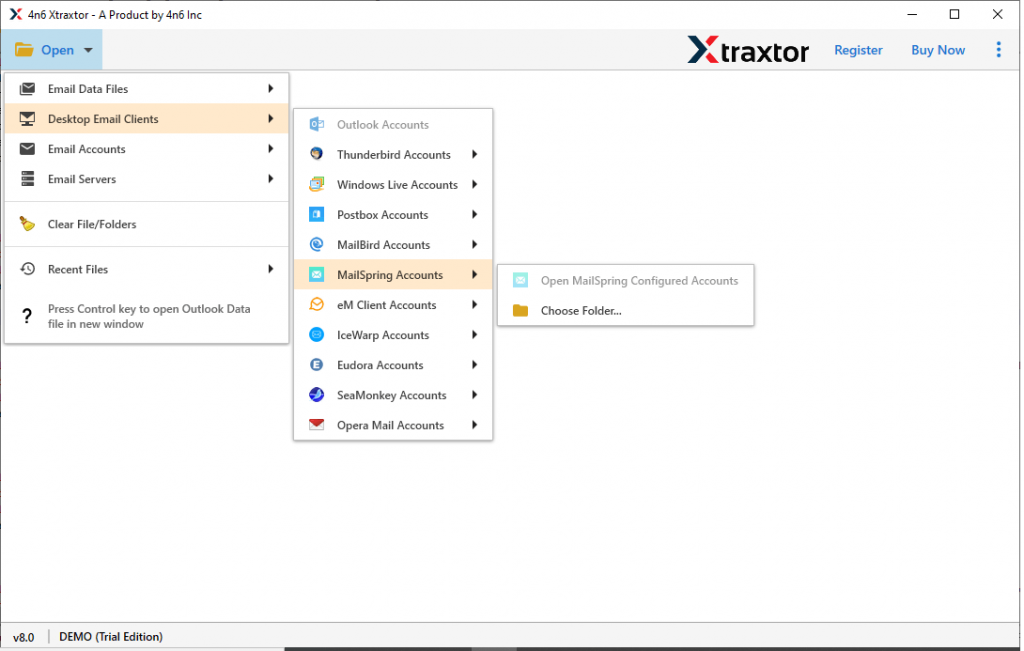
Step 3. This tool scans your emails and shows them in its interface to read and choose the folder or emails that are needed to convert.

Step 4. At this step, hit on the Export and select PDF as a saving option.

Step 5. At last, browse the targeted location and click on the Save button.

All Done! You easily convert MailSpring emails to PDF format in simple 5 steps.
Outstanding Feature of MailSpring to PDF Converter
Some of the eye-catch features of this tool are,
- Allow to batch export emails from MailSpring account without data loss.
- Convert MailSpring to PST, MBOX, CSV, and other file formats.
- Email filter option for selective MailSpring email conversion.
- Extract email addresses, phone numbers, etc information from the mailbox.
- Preserve mailbox folder or sub-folder structure and hierarchy during the conversion process.
- Directly export MailSpring emails to Office 365, Gmail, Thunderbird, and many more.
- Support Windows 11, 10, 8, XP, Vista, and all other previous OS versions.
- Offer dual option to upload MailSpring emails, Directly form account or select folder.
- Automatically detect MailSpring configured account from the system and convert ist email in .pdf format.
Wrapping Up
Today we talk about the automated way to convert MailSpring emails to PDF format. You can try the demo version of this tool and save your MailSpring emails as .pdf format with ease.