In this digital age, everyone uses email to communicate with each other. In the aspect of emails, there are different file formats used by different email clients to save their data. And among these file formats, most email clients support the .eml file extension. That’s why most of them want to convert EML to TXT format. Let’s try to understand why many users want to export .eml files in .txt format via user query.
User Queries Related to EML to TXT Conversion
“Hello, I have multiple EML files on my system and I want to export these emails into plain text format. Is there any secure way to convert EML to TXT format?”
“I have EML files that I download from Thunderbird email client and now want to save these emails in plain text format? Is it possible, if yes, then how?”
Are you also searching for a way to export EML to TXT, then don’t worry you landed in right place. Here we will describe the best possible way to save .eml files in a plain text format. In addition, we demonstrate in detail the operation of the methods indicated. So stay with us at the end of this article.
Methods To Convert EML to TXT Format
#1. Convert EML to TXT using Thunderbird
#2. Convert EML to TXT using EML Converter
These Two methods are tested by experts and do the conversion process. Let’s know how these both methods can help to export EML to TXT format.
Method 1: Save EML file As TXT Format Using Thunderbird
In this method, firstly we need to install the Mozilla Thunderbird email client on systems. If users have this application on their PC then they open this email client and follow the below-given steps.
Step 1. Open Mozilla Thunderbird on the machine.
Step 2. After this, Import EML files on the software interface by using Ad-on. Right-click on Local Folder >> ImportExport Tool NG >> Import Message.
Step 3. Select an email from the system and click on add file. Your EML file is imported on the email client interface. Now transfer the import file into plain text format.
Step 4. Right-click on the message to be converted, then Save Selected Message >> Plain Text Format.
Step 5. Choose the location to save the plain text files and click on Select Folder.
Here your EML file is converted to plain text format, browse it to the selected save location. But there is a big drawback with this method, it doesn’t export attachments with messages. Most importantly, in this method users have to perform each step with patience because a single mistake can lead to data loss.
To overcome this limitation we are going to talk about an automated tool that is smart enough to perform each and every task without any glitches. Let’s move to the next section and walk through the software working and its features.
Method 2: Create Plain TXT format From EML file using Professional Techniques
EML to TXT Converter is an expert utility that allows users to export multiple EML files in plain text format without any data loss. The most important feature of this tool is that it converts multiple EML files with attachments. Besides, it also exports EML files to cloud-based mail servers like Office 365, Yahoo, Thunderbird, Opera Mail, Gmail, etc.

Steps to Convert EML to TXT format using this utility;
Step 1. Download and open EML Converter on your system.
Step 2. Click on the Open option present on the screen.

Step 3. After this, Select Email Data File >> Select EML File >> Select File or Folder.
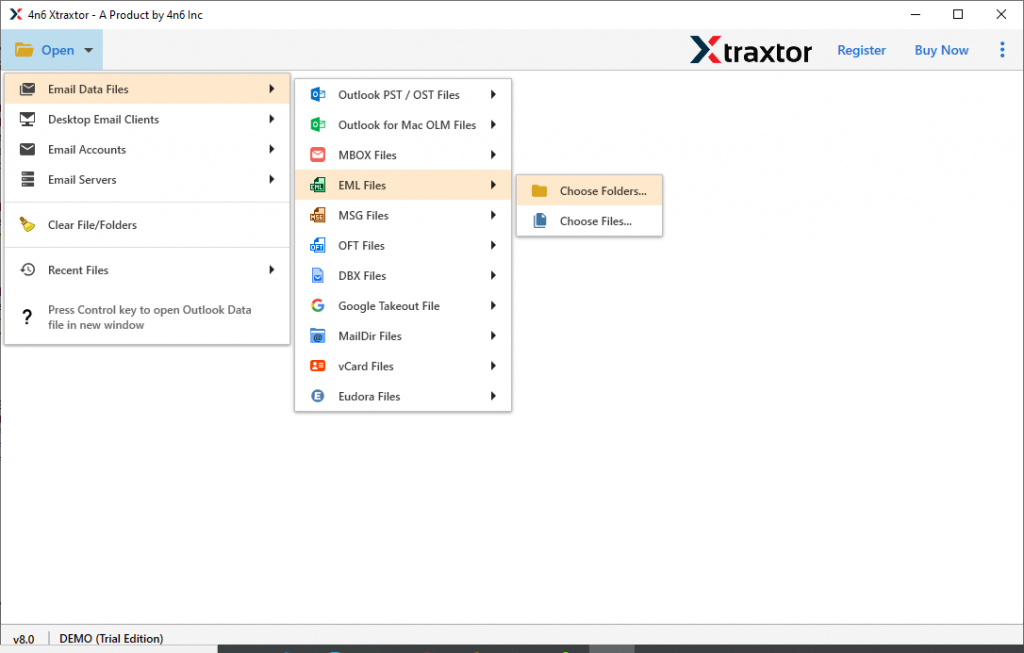
Step 4. All emails present on file will be shown in the software interface.

Step 5. Go to the Export option and select TXT format.

Step 6. In the last step, browse the targeted location and click on the Save button.

Here you successfully export EML to TXT format using above mention tool. This utility possesses some outstanding features, some of them are mentioned below;
Why Choose EML to TXT Converter
- Export EML Emails With Attachments
one of the best attributes of this tool is its file conversion with attachments. This tool transfers all messages from EML files into plain text format without losing any data. It creates a separate folder of attachments from messages after the conversion process.
- Fetch Email Information
Using this software it is easy to extract different information from emails presents on EML files. This tool gives the option to extract email addresses, phone numbers, attachments and associated email addresses and phone numbers from the EML file and create a separate folder for it.
- Batch Convert EML Files
This tool is capable of exporting multiple EML files to plain TXT format in one attempt. It makes sure to convert numerous emails in just a few clicks without any data loss. Also, there are no size limitations when transferring EML files in TXT format using this tool.
- Interactive User Interface
This wizard is designed in such a way that it can be used by novice users without facing any hassle. The properties of this tool are designed in an adequate explanatory way so that users can easily understand it. The main point is that users do not require any technical help to know the functionality of this tool.
Conclusion
In this blog, we suggest the best possible solution for your question How to convert EML to TXT format? We provide 2 different methods to perform this conversion. in the manual method, you can export the message without attachments. To solve this and other problems we propose an automation tool that converts the top EML TXT format with attachments. This tool also helps in EML to CSV conversion and other file conversions.
Frequently Asked Questions
Question 1. There are 30+ EML files, can I export them into plain text format?
Answer. Yes, with this tool you can easily export multiple emails into plain text format without any data loss.
Question 2. I want to convert EML to HTML with attachments. Is it possible with this software?
Answer.Yes, this software export emails with attachments without any issue.
Question 3. Is there a way to export some selective EML emails into TXT format?
Answer. Yes, this tool offers an email filter that allows you to convert selective emails from EML files as per your requirement.