Here in this blog, we discuss one such scenario where we learn the secure way to backup Mailbird emails with attachments. If you are among those who want to backup all the emails from your Mailbird account, then this post is for you. Read till the end and download Mailbird emails with attachments.
Let’s move ahead and start the downloading process automatically without any further delay.
How to Backup Emails from Mailbird to PC?
MailBird Converter is the secure and efficient approach to downloading your Mailbird emails to your systems. The software effortlessly backup emails directly from your configured Mailbird account in a few simple clicks. You need to select your configured Mailbird profile and choose the export option and the tool will automatically save your mailbox data in a file format on your system.
There is a demo version of the software available. Click the below link and download the software.

Steps to Backup Mailbird Emails with Attachments
1. Run the SysConverter for Mailbird on your system.
2. Select Open >> Desktop Email Client >> Mailbird Account >> Select Profile.

3. Here you can view your mailbox data.

4. Click on Export and choose from the given option.

5. Browse the location to save the exported data file and hit the Save button.
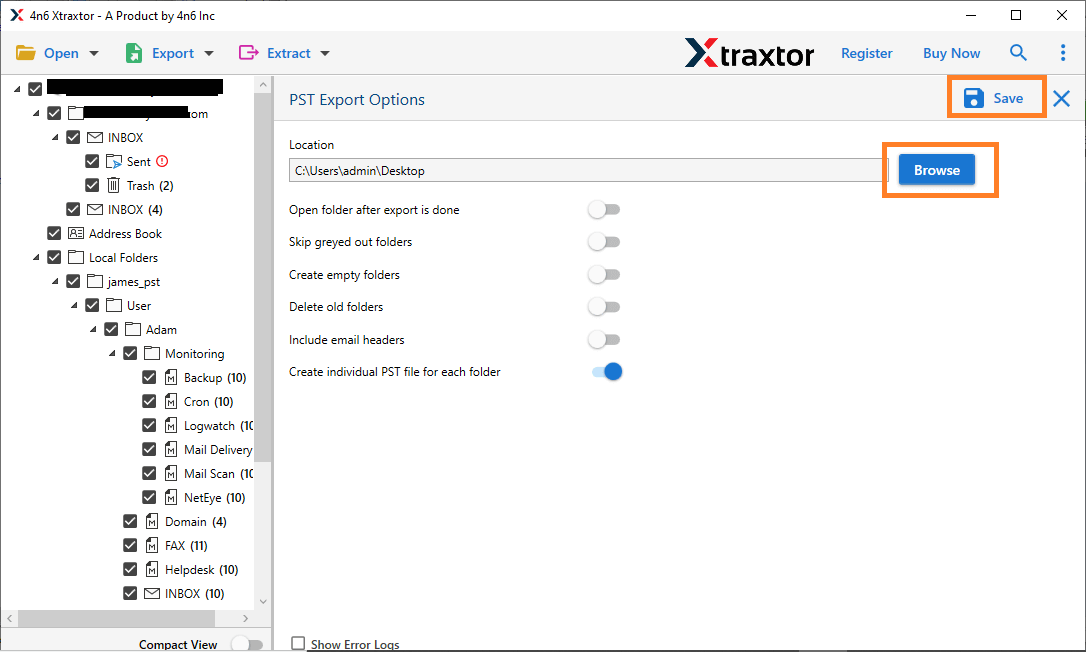
Done! Here you backup Mailbird emails in a few simple clicks. You can use the tool and download your mailbox data. However, before that, let’s know why you should backup your data.
Why Use Automated Tool?
Some of the benefits of using the Mailbird Backup Tool –
- Direct backup from Mailbird mailbox without any hassle.
- Maintain email folder and sub-folder structure and hierarchy.
- Preserve email key elements and attributes.
- Advance filter options to backup selective emails.
- Export Mailbird emails to PST, PDF, CSV and many other file formats.
- Allow to view in different modes emails before downloading them.
Conclusion
Here in this post, we discuss the secure and instant approach to download Mailbird emails with attachments. Read the complete blog and download Mailbird emails to your system, then this blog is for you. If you haven’t already backed up your important data, now is the time to do so and ensure its security.