There are many users that are searching for a way to move PST file to AOL Mail account. If you are among those then, this article will guide you to import PST to AOL Mail account with or without Outlook.
AOL Mail is a free web-based email service used around the world. Because of its cloud-based service, many users choose webmail instead of relying on desktop applications. One such situation is when a user has a PST file and wants to access their email in their webmail account.
In this article, we will discuss two different ways to import PST to AOL Mail account. Therefore, if you want to perform the import process efficiently and accurately, please read the full article to the end.
Before that let’s check a user query and know the situation more clearly.
“I am using the AOL Mail service to send emails and would like to continue using it. Recently I received a PST file with some important emails that I desperately need. But the problem is that AOL Mail doesn’t provide an option to open PST files in its interface. Can anyone suggest to me an instant solution to upload Outlook PST to AOL webmail account?”
Methods to Import PST Emails to AOL Mail
Here in this write up we will discuss two different techniques to import PST to AOL Mail. Let’s check what are they.
1. Upload PST to AOL Mail Without Outlook
2. Move PST File to AOL With Outlook
Let’s discuss both methods in detail and move emails and other data from PST file to AOL mail account.
How to Import PST to AOL Mail Instantly?
To offer a secure and instant PST to AOL import, we will learn about an automated tool. PST Converter is a complete solution that easily import email from Outlook PST file into AOL webmail account. Using this utility you can transfer emails, contacts, calendars, tasks, journals, etc to your webmail account without any data alterations.
Click the below link and try the demo version of the software.

Simple Steps to Upload PST Emails to AOL Mail Account –
- Install and run SysConverter for PST on your machine.
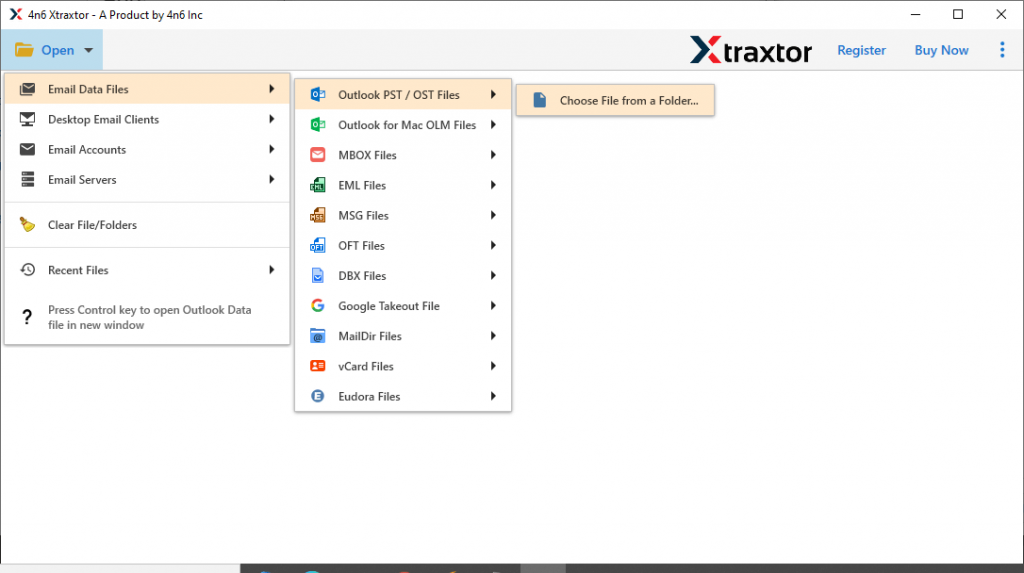
- After that, click on Open >> Email Data File >> PST File >> Select File from Folder.
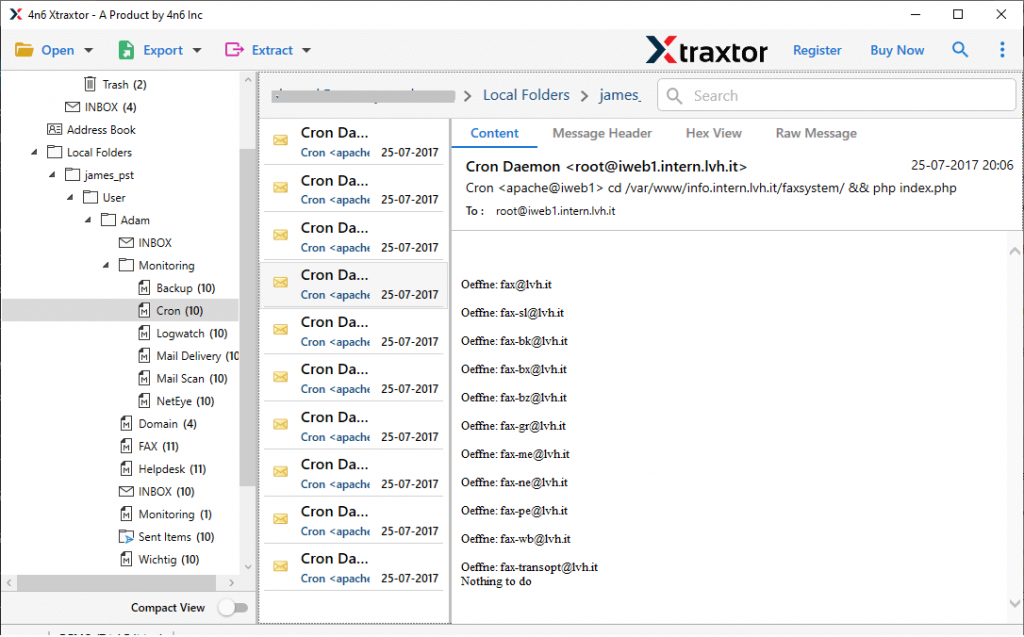
- Here you can view your emails in the software interface in a different mode.
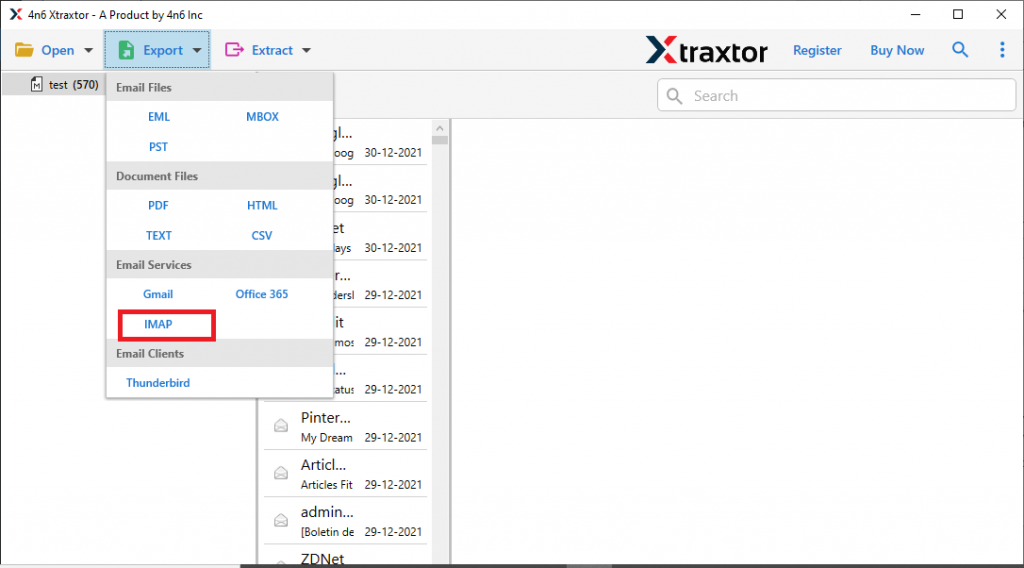
- Click on Export and select IMAP as a saving option.
- In the left panel of the software, you will find emails in their specific folders. Select the folder that you want to import.
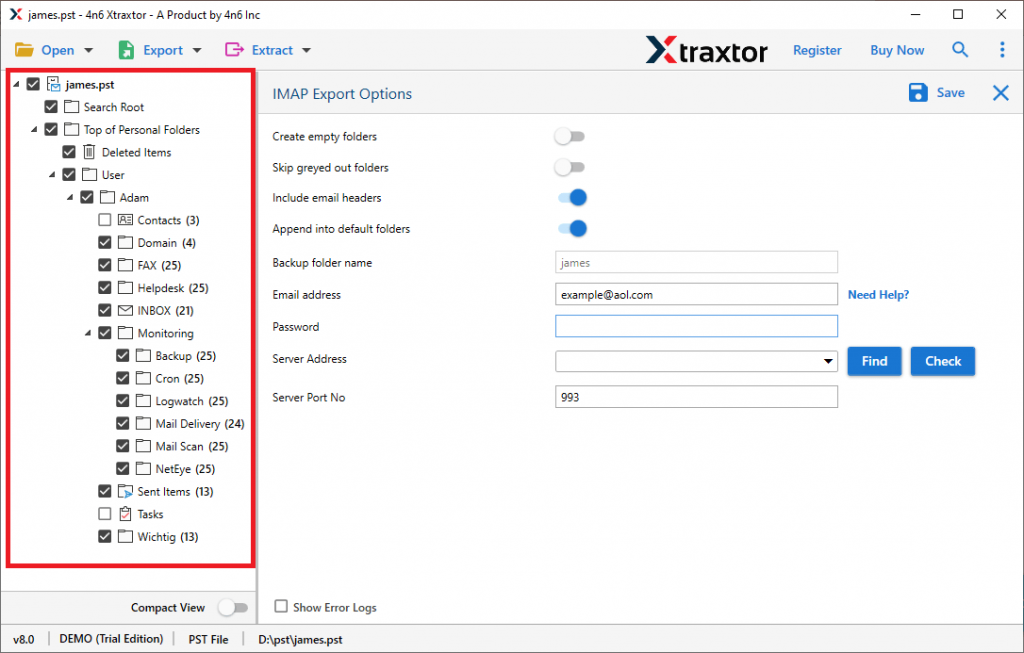
- At last, enter your AOL Mail email address and password and hit on the Save button.
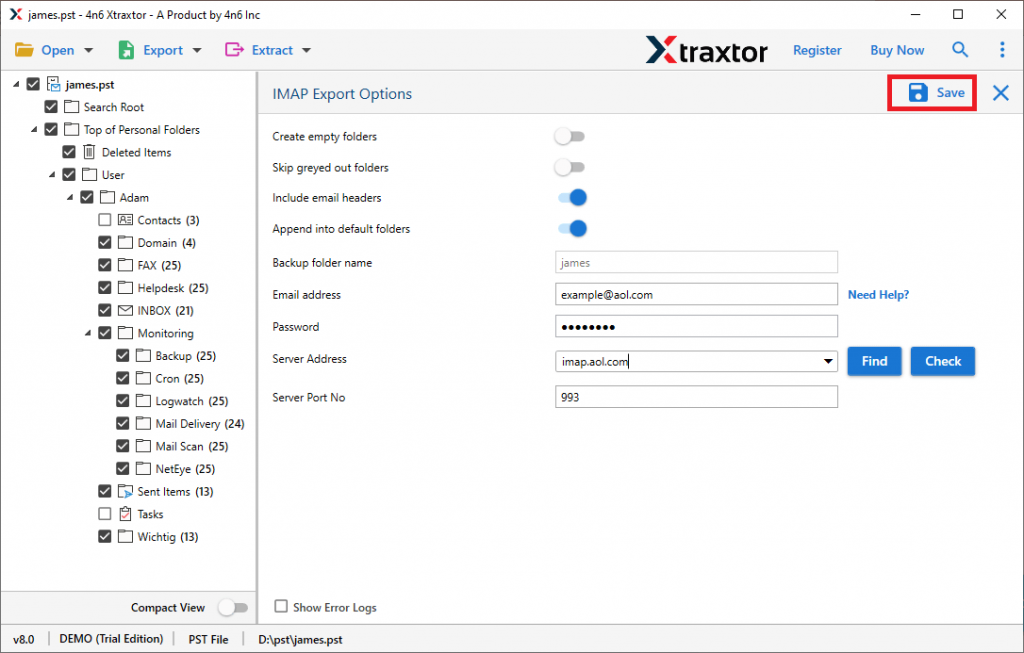
Here completes the import process. Now you can access the PST file emails into AOL webmail account.
Benefits of Using PST to AOL Mail Import Tool
This professional utility has many advanced features that make the import process more efficient. Take a good look at them.
- Maintain Mailbox Hierarchy: While importing PST file to AOL Mail account, this utility preserves the mailbox folder and subfolder structure and hierarchy. It will import the emails into the webmail account in the same way as the original.
- Move PST to Other Webmail Accounts: With this utility, you will get an option to move PST file to other cloud-based email servers. It will directly import emails from PST to Office 365, Google Workspace, GoDaddy, Yandex, Yahoo and other webmail accounts.
- Email Filter Option: With PST to AOL Import tool you will get an inbuilt filter option. One can apply various filters such as – to, from, date range, time, subject, name, property id, content, has attachments, and many more.
- Extract Data: This utility offers an option to extarct email addresses, phone numbers, attachments, associated email addresses & phone numbers and contact photos. All the extracted data will be saved in a single text file.
Although this automated tool is efficient enough to perform the import process without any data loss and facing any glitches. Still if one wants to manually perform this importing process, then read the next segment of the blog.
How to Import PST to AOL Mail Manually?
To perform the import process with native method, then you need to install Outlook email client on your system. After that configure your webmail account with this desktop application. Let’s go through this process.
Step 1: Generate App Password For third Party Tool
- Sign in to your AOL mail account using your login details.
- Go to your AOL profile and choose the Account Info option.
- In the menu bar, select Account Security and click on Generate App Password.
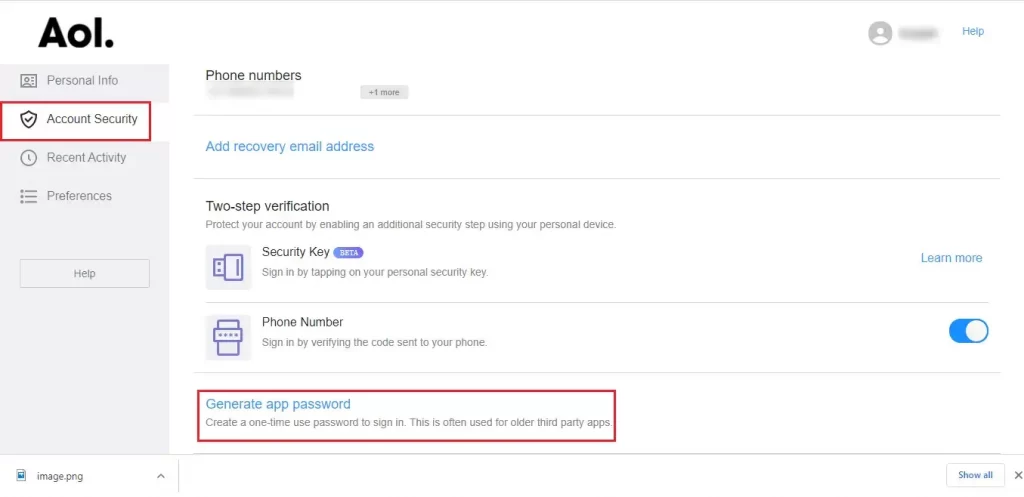
- In the pop-up screen, select Outlook desktop and clcik on Generate.

- Copy the password and save it for further use.
Step 2: Configure AOL Mail to Outlook
-
- Install and open the Outlook email client on your Windows system.
- Click on File >> Info >> Add Account.
- Select Manual Setup and choose the POP or IMAP option.
Now enter your AOL Mail account email address.
In Account type – IMAP
Incoming Mail Servers: imap.aol.com Port Server: 993
Outgoing Mail Server: smpt.aol.com Port Server: 587
- No put your AOL Mail login details. (Enter the password you generated in step 1).
- Click on OK >> Next to test the setting and IMAP configuration.
- After the test is complete, click on Close and the last Finish button.
Now your AOL Mail account is configured with Outlook. After that import PST file from your system to Outlook interface using Import\Export Tool. At last, move the PST file under the AOL id label.
Here you manually import PST to AOL Mail using an email client. Regardless, this native solution has some limitations.
Loophole In Manual Method
1. Lengthy process and required patience for configuration.
2. Need Outlook email client installation that is a paid service.
3. Require technical support to configure AOL to Outlook if you are not a specialised person.
4. One wrong step and your webmail account got affected ( data loss).
5. No option to import selective email to AOL account.
6. There is no guarantee to maintain the integrity and hierarchy of mailbox data during the import process.
Therefore, we would definitely recommend you choose a PST to AOL import tool and import PST to AOL mail in a seamless manner without any limitations.
Conclusion
In this post, we try to provide you with effective solutions to import PST file into AOL mail account with complete data. The import process can be easily performed using the software. While a manual method is mentioned to import data files, it also has limitations. You can choose any method and move emails from PST file to AOL webmail account.