Summary: This will describe the instant way to migrate MDaemon to Exchange Server account with attachments. If you are also looking for a secure approach to Import MDaemon Emails To Exchange, then the article is for you. Read the article and know the best tool to move MDaemon emails to Exchange 209, 2016 and all other previous versions.
MDaemon is an email server as well as an email client with multiple accounts integrated with it. User can easily manage their emails, contacts, calendar, and others through this application. However, sometimes users want to switch their mailing platform from MDaemon to Exchange Server. In that case, they need to transfer their mailbox data as well.
Transferring data from one platform to another is not an easy task to perform. To make the import process easy and accurate, the use of a third-party solution is a must. One such tool that swiftly import MDaemon emails to Exchange is MDaemon Converter software.
Before we discuss the working of this tool to migrate MDaemon to Exchange, let’s analyse the user intent through a query.
“I recently switched from MDaemon to Exchange Server and I want all my mailbox data in my new email account. However, I have no idea how to migrate MDaemon to Exchange Online or Hosted Server/. Can anyone tell me a reliable solution to transfer emails from MDaemon to Exchange Server without compromising data integrity?”
Considering this user’s query, let us know how the automated tool performs MDaemon to Exchange Migration without data loss.
How to Import MDaemon Emails in Exchange Mailbox?
The import process will be easy if the tool you use is reliable and secure. MDaemon Converter is one such tool that can easily move MDaemon emails to Exchange without data loss. This utility transfers emails from multiple accounts that are integrated with MDaemon to Exchange with ease. Using this tool you can also import selective MDaemon emails to your Exchange account within a few steps. In addition to these, the software is capable enough to detect the default location of the MDaemon database and transfer its mailbox data.
When migrating MDaemon to Exchange, this automated tool maintains mailbox hierarchy and structure. Along with that, also offer an advanced filter option to search emails from multiple mailbox data.

Follow the steps to migrate MDaemon to Exchange With Attachments.
-
- Install and run this tool on your system.
- Click on the Open drop-down menu and select the required option.
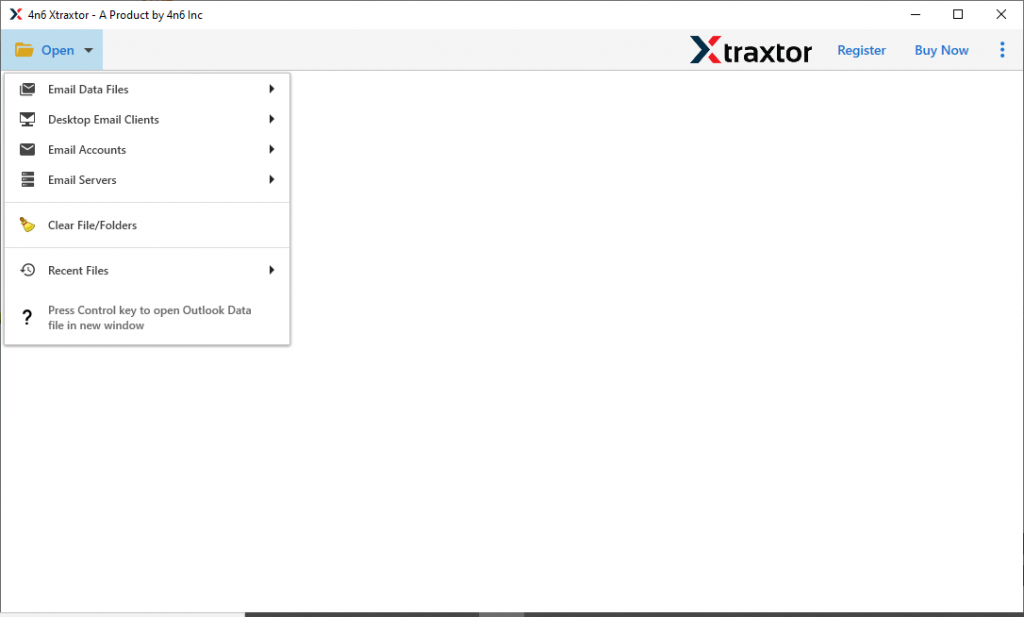
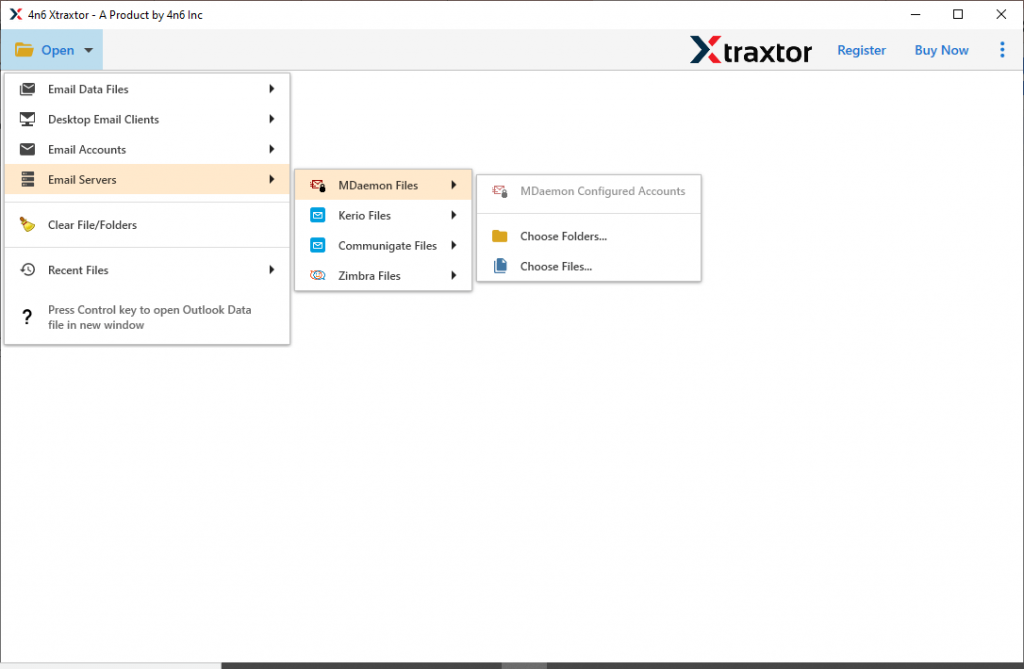
- Now choose, Email Server >> MDaemon File >> Open Configured account or Select File/Folder.
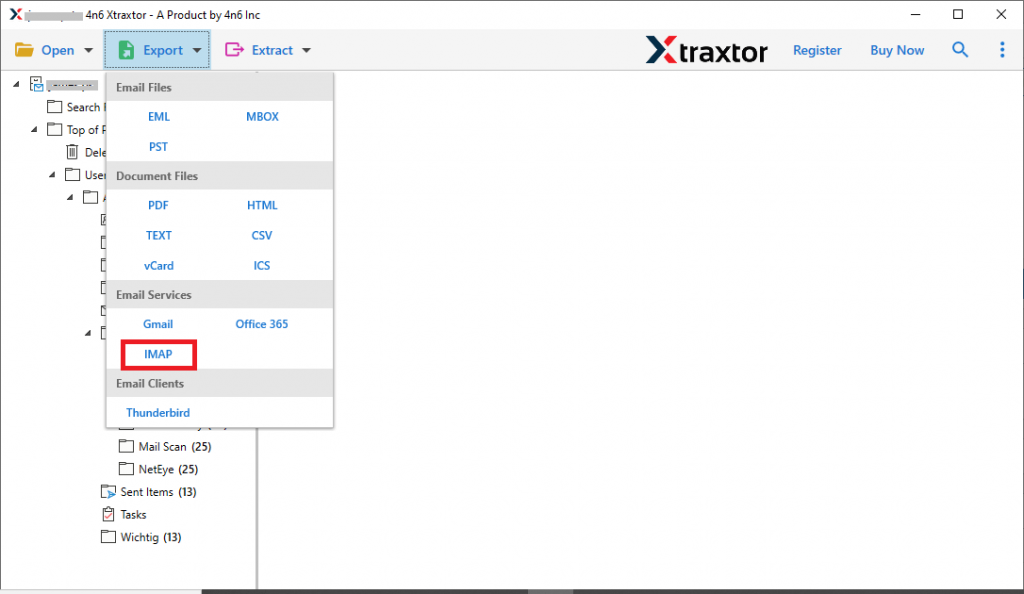
- Here, you will find all the emails from the MDaemon account. Read them and select the email folder that needs to transfer.

- Click on the Export and opt for the IMAP option.
- At last, enter your Exchange account login details and hit on the Save button.
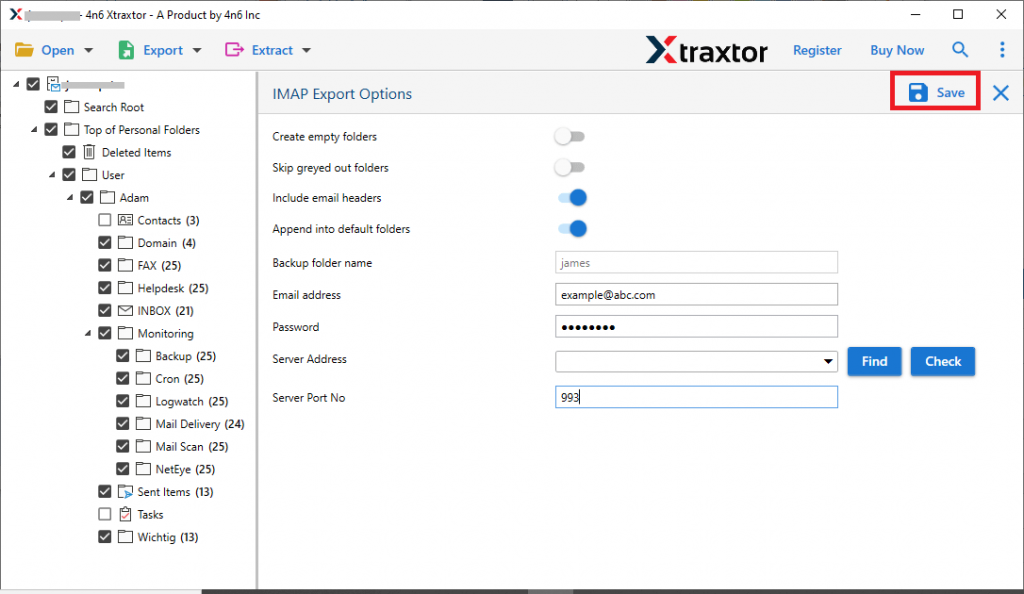
Here efficiently migrate MDaemon to Exchange account with complete mailbox data. You will find your old emails in your Exchange account along with attachments.
Reasons To Choose MDaemon to Exchange Migration Tool
This software has multiple prominent features some of them are mentioned here. Look at these.
Import MDaemon Emails In Bulk: This tool allows you to select the folder of multiple MDaemon account data. After the selection user can easily import them into Exchange account with ease. Most importantly, there will be no single bit of data loss.
Search Option: If there are unlimited MDaemon emails in your mailbox data, and you want to transfer limited emails only, then this tool offers a search filter. Various filters offered by this tool are – to, from, subject, cc, bcc, date range, time, has attachments, property id & name, and many more. Simply apply the filters and import selective emails.
Maintain Mailbox Structure: This tool efficiently import MDaemon emails to Exchange without affecting their structure. This tool maintains the mailbox folder and subfolder hierarchy during the import process. In the end, you will get our emails as the same as the original without any modification.
Windows-Based Software: The MDaemon to Exchange Migration tool is designed for Windows-based OS. This utility is compatible with Windows 11, 10, 8, Vista, XP, and all other previous versions without any technical issues.
Easy To Use Software: This automated import tool is designed for both technical and non-technical uses. With its easy procedure, even novice users can move their MDaemon emails to Exchange accounts without any technical assistance.
Different Mode to Load Emails: The MDaemon to Exchange Migration tool offer different ways to upload MDaemon emails to import them into the Exchange Server account. The user either selects the configured email account option or manually adds the mailbox data file. Bothe the way you can transfer your emails within a few simple steps as mentioned above.
Conclusion
Moving emails from MDaemon to Exchange is not an easy job to do. However, with a reliable tool, it is possible to import MDaemon emails to Exchange with no data loss. One such tool we mention in this blog along with its step-by-step working. Try the demo version of this tool and go through the import process. I hope with the help of this utility you are able to migrate MDaemon to Exchange Server with ease.