Email conversion is not an easy task, especially if you don’t know how to do it. We’ll have one of those conversations here, where we’ll learn how to convert Opera Mail to Thunderbird account with attachments.
The real task with Opera Mail to Thunderbird export is not knowing how to do it. In this blog post, we will discuss this process in detail.
While converting Opera Mail to Thunderbird, you should keep one thing in mind: Using any untested method may corrupt your data. Therefore, opt for a method to transfer emails from Opera Mail to Thunderbird account that is safe and efficient.
Before we dive in, get to know about Opera Mail and Thunderbird.
Opera Mail is a free email client. This desktop application can set up many email accounts and manage them efficiently. However, it is an outdated email client thus no updates or advanced features or security.
Why use it when you have an alternative free desktop email client like Mozilla Thunderbird?
Worrying about your data, whether it will be safe during the conversion. Don’t worry, convert Opera Mail to Thunderbird, while the tool we are going to discuss in this blog post will take care of it.
Why Users Choose Mozilla Thunderbird
There are various reasons why users want to switch their email clients from Opera Mail to Thunderbird. Some of the benefits of using Thunderbird are,
1. Advanced search and filter option.
2. Integrated Calendar Application (PIM).
3. Cross-platform application for email management.
4. Security, privacy and data ownership.
5. Large Variety of Add-ons that can be customized.
6. Additional features such as chat, RSS feed reader and newsgroup.
How to Transfer Opera Mail Emails to Thunderbird Account?
If you manually want to convert Opera emails to Thunderbird account, then you can do it. For that, you need to configure your Opera Mail email account with Thunderbird.
- Firstly Open your Thunderbird profile and click on the Setting button.
- Then Settings >> Account Setting >> Account Action >> Add Mail Account.
- Enter your Opera Mail email account login details.
- Then, enter the IMPA and SMPT Server details.
- At last, Finish the configuration and restart your application.
Your all Opera Mail account emails will automatically sync in your Thunderbird profile. If you want an instant and effortless solution to complete the converting, then you can use the automated solution that is mentioned below.
How to Export Opera Mail to Thunderbird?
Unfortunately, there is no direct way to export Opera Mail to Thunderbird. To perform this process, you need to use an automated tool that can easily transfer email from Opera mail account to Thunderbird interface. One such tool is Opera Mail Converter, which can save Opera mail with full efficiency. The advanced algorithm of this tool performs the conversion process without affecting data integrity.
Along with that, you can convert emails from Opera to Thunderbird with all attachments and mailbox data. Other additional features of this utility are advanced search options, selective email conversion, maintenance of mailbox structure and hierarchy, freedom to choose the storage location and many more.

Steps to Convert Opera Mail to Thunderbird With Attachments
1. Download and run this tool on your system.
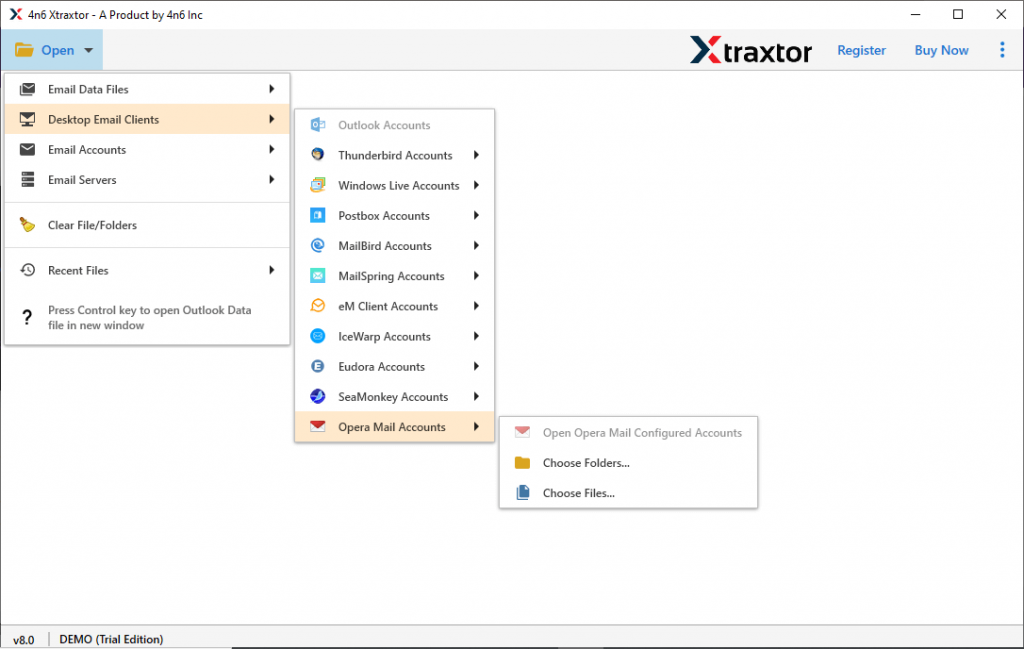
2. Click on the Open drop-down option and select the required field.

3. After that select Desktop Email Client,>> Opera Mail Account >> Open Configured Opera Mail account or Select File or folder.
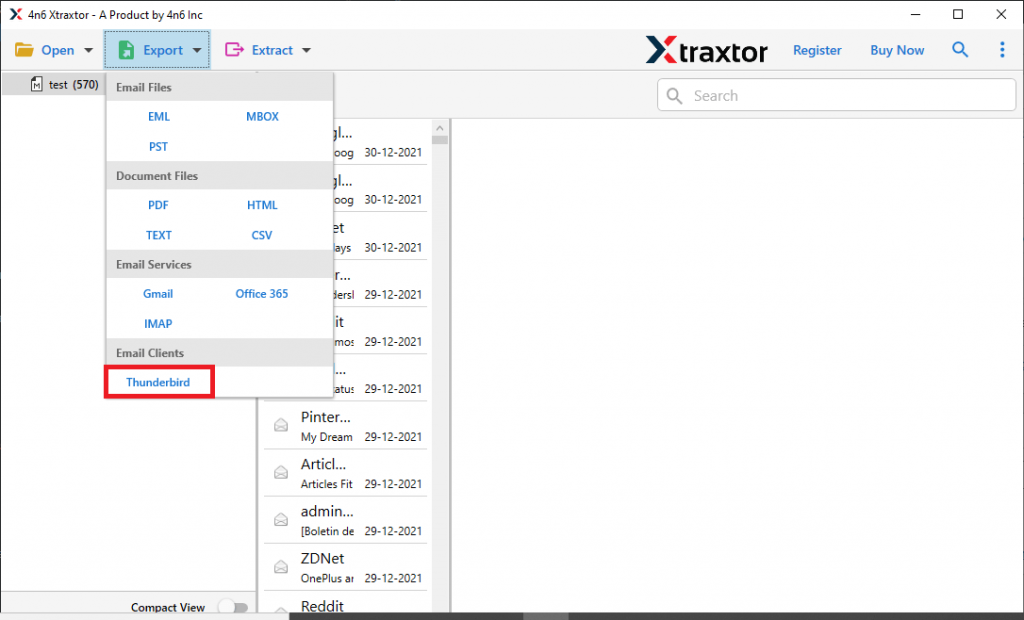
4. You can view and read your emails, after that, select the email folder that you want to transfer.

5. Now after selection click on the Export and choose the Thunderbird option.
6. At last, browse the location where Thunderbird profile data is saved and click on the Save button.
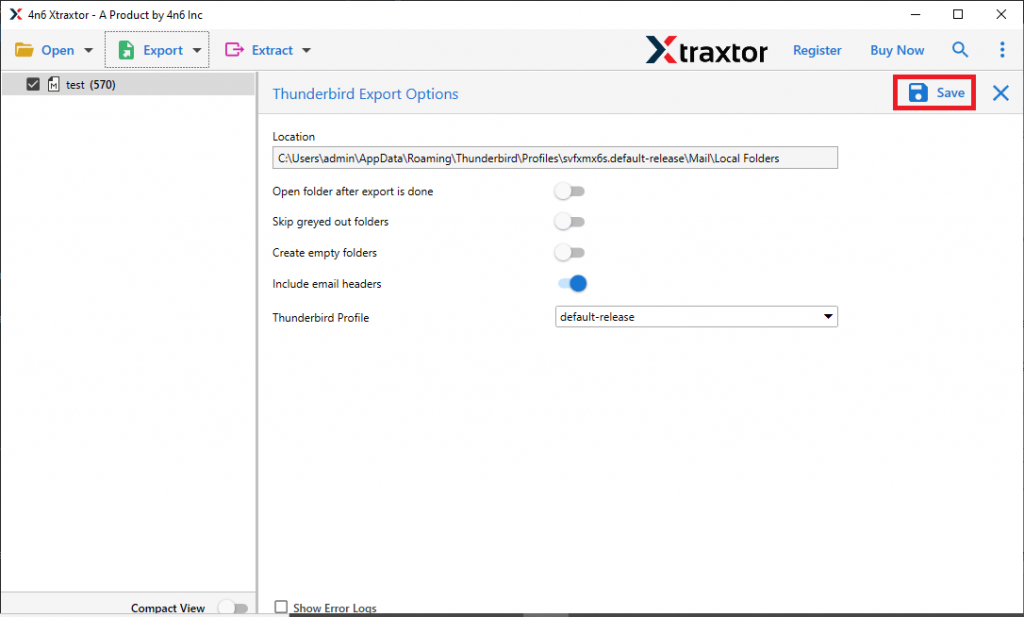
All Done! All your Opera Mail account data is transferred to Thunderbird. Now you can continue your email management with Thunderbird.
However, if you have an Opera Mail data file, then also you can perform the above steps and convert Opera Mail to Thunderbird. If you don’t have an MBS file and want to export it from an Opera Mail account, then perform the process mentioned in the next section.
How to Export MBS File from Opera Mail
Follow the steps to save Opera Mail account data into a .mbs file format.
1. Open the Opera Mail account on your system.
2. Select the folder that needs to export.
3. After that right-click on the selected folder and click on the Export button.
4. Name the exported MBS file in a specific directory as per your need.
Here complete the process. Now you have a data file, now you can perform the Opera Mail to Thunderbird conversion.
Features Of Opera Mail to Thunderbird Converter
Some of the outstanding benefits of using this utility are mentioned here, check them out;
- Auto Detect Opera Mail Account: This converting wizard automatically detects the configured Opera Mail account. After that upload its emails and transfer them into Thunderbird email client with attachments.
- Export Mailbox Data to Cloud: The Opera Mail to Thunderbird Converter transfers emails to another email client and servers. Using this tool you can convert Opera Mail to Outlook, Office 365, Gmail and other accounts.
- Advanced Search Option: This utility offers a search option to convert emails from particular categories and attributes. You can export emails using filter options such as to, from, subject, date range, property id, and many more.
- Multiple File Saving Options: With this utility, you can also convert Opera Mail to PST, MBOX, CSV, HTML, PDF, and other file formats. Most importantly all these saving options will be presented in a single interface.
Conclusion
At some point, we think that it is a difficult task to perform. However, with the correct techniques, we can process it efficiently. Such conversion is discussed in this blog where we learn the best way to convert Opera Mail to Thunderbird account. Follow the simple method mentioned here and convert Opera to Thunderbird without any problem.